What Is a Headless CMS? A Business Owner’s Plain-English Guide
Most business owners know what a CMS is — WordPress, Squarespace, Wix. You log in, write content, and it appears on your website. A headless CMS looks nearly identical from the inside but works in a fundamentally different way on the back end, and that architectural difference is now reshaping how websites, mobile apps, and AI interfaces all get their content. If you’re evaluating a new digital platform, considering a rebuild, or simply trying to understand what your developers mean when they say “headless,” this guide gives you everything you need.
The Traditional CMS Problem (and What “Headless” Solves)
A traditional CMS was designed for a single purpose: managing a website. Content and presentation live in the same system — a WordPress post, for example, is stored in a database and rendered by a PHP template that produces HTML for a browser. That tight coupling works perfectly when you have one website and nothing else.
The problem arrives when your business grows beyond a single channel. You need the same product descriptions on your website, your mobile app, your in-store digital kiosk, and your voice assistant. A traditional CMS has no good answer for that. It was built to speak only to a browser.
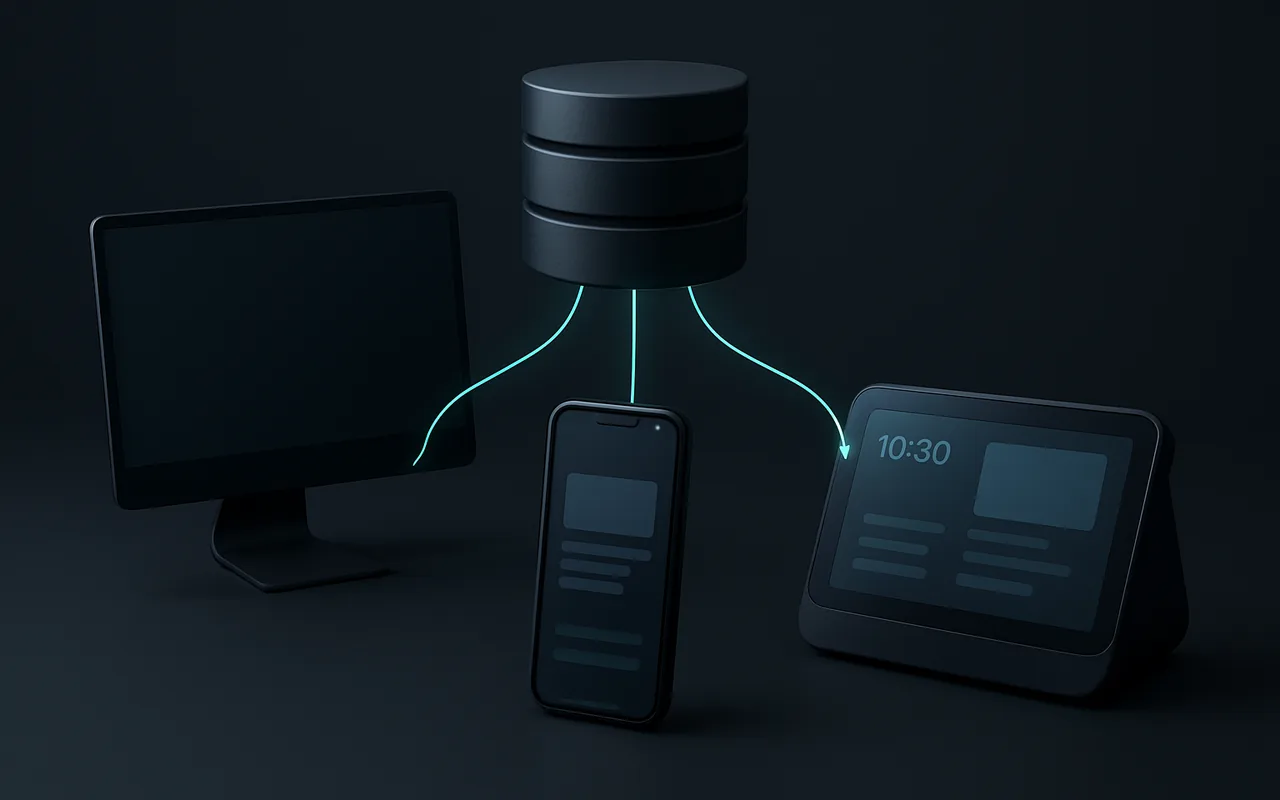
The term “headless” comes from removing the “head” — the frontend that presents content — from the CMS. What remains is a pure content backend: a structured content repository that delivers data via API to whatever frontend wants to consume it. One content model, unlimited output channels.
How a Traditional CMS Works
In a coupled CMS architecture (WordPress, Drupal in default mode, Squarespace), the editorial workflow and the rendering engine share the same system. A content editor writes a blog post, selects a template, and the CMS merges the two to produce an HTML page that it serves directly to the user’s browser. There is one source and one output format: HTML for a desktop or mobile browser. Any other channel requires a separate solution bolted on the side.
How a Headless CMS Works
A headless CMS — also called a decoupled CMS or API-first CMS — stores your content in a structured cloud backend. Content is authored in an interface that feels similar to WordPress: you fill in fields for a title, body text, images, metadata. But when that content is published, it does not get rendered into HTML. Instead, it becomes structured data available through a GraphQL API or REST API.
Any frontend — a Next.js website, a React Native mobile app, a voice assistant, a digital kiosk — can then request that content and render it however it chooses. The presentation logic lives entirely in the frontend, not the CMS.
A useful analogy: a headless CMS is a content warehouse that ships raw ingredients. Any kitchen (frontend) can receive those ingredients and cook them differently — fine dining website, fast-food mobile app, or a drive-through voice interface. The warehouse does not dictate how the food gets plated.
Key Benefits of a Headless CMS for Business
The business case for headless architecture centres on omnichannel reach, performance, and long-term flexibility.
| Benefit | What it means in practice |
|---|---|
| Omnichannel delivery | Write content once, publish to your website, mobile app, voice assistant, digital signage, and AI chatbot simultaneously |
| Better performance | Static or ISR frontends served via CDN consistently score “Good” on Core Web Vitals, which improves SEO rankings |
| Developer freedom | Frontend teams choose their own stack — Next.js, Vue, React Native — with no theme lock-in or template constraints |
| Easier personalisation | API responses can be filtered by user segment, locale, or device before delivery |
| Future-proofing | AI agents and voice interfaces consume the same content API without any CMS changes |
The performance advantage deserves attention. Headless frontends built with server-side rendering (SSR) or incremental static regeneration (ISR) are typically deployed to a global CDN as part of a Jamstack architecture. Edge delivery means your pages load from a node close to the user rather than waiting for a server to generate HTML on request. Research from web performance consultancies consistently shows that sites adopting this approach move their Core Web Vitals scores from “Needs Improvement” to “Good” after migration — a meaningful signal for SEO. According to a 2025 survey by Contentful, 61% of companies that switched to a headless CMS reported increased digital ROI within 12 months of launch.
When a Headless CMS Makes Sense — and When It Doesn’t
Headless architecture is a genuine technical upgrade in the right context. In the wrong context, it adds cost and complexity without proportional gain. The decision comes down to your channel requirements and team capacity.
Good fit for headless
- You need the same content on multiple channels: website, mobile app, kiosk, chatbot, or voice interface
- Fast-scaling e-commerce that needs a custom storefront beyond what Shopify themes allow
- You have — or plan to hire — dedicated frontend developers comfortable with a JavaScript framework
- You are running omnichannel marketing campaigns where content must be consistent across every touchpoint
- Enterprise operations requiring localisation across many locales simultaneously, driven from one content model
- You want an AI-ready architecture where an LLM can query your content API directly to generate responses
Stick with a traditional CMS if…
- You have a single website with no apps or additional channels planned in the next 12 – 24 months
- Your team has no in-house developers — headless always requires custom frontend work
- Your infrastructure budget is under roughly $500/month and launch speed matters more than architecture
- You need a fast, low-cost launch where WordPress or Shopify already covers 100% of your requirements today
- Content workflows rely heavily on non-technical staff who need an all-in-one tool without developer dependency
Popular Headless CMS Options in 2026
The market has matured significantly. Here are the four platforms most commonly chosen by businesses building their first headless stack, alongside a selection note for each.
| CMS | Best for | Pricing | Hosted? |
|---|---|---|---|
| Contentful | Enterprise multi-channel content at scale | Free tier / from $300/mo | Yes (cloud-only) |
| Strapi’s open-source headless CMS | Self-hosted control, open-source flexibility | Free (self-hosted) / Cloud plans from $29/mo | Both |
| Sanity | Real-time collaboration, highly structured content types | Free / from $15/user/mo | Yes (cloud-only) |
| Hygraph | Federated content from multiple sources, GraphQL-first teams | Free / from $299/mo | Yes (cloud-only) |
All four platforms offer both REST and GraphQL API access. A practical decision guide: if your team is starting out with limited budget and wants full data control, Strapi on a $20/month VPS is the lowest-cost entry point. For enterprises that need SLA guarantees and enterprise-grade access controls, Contentful or Hygraph are the common choices. Sanity suits teams that produce highly structured content (catalogues, documentation, product specs) and want real-time collaborative editing.
One consideration worth flagging: the “best” headless CMS is largely determined by the content model you need, not by the platform’s feature list. Before evaluating tools, map out your content types (articles, products, landing pages, FAQs) and the relationships between them. That model dictates which platform fits — not the other way around.
What Does a Headless CMS Project Cost?
Cost ranges vary enormously because the CMS itself is often not the biggest expense — the custom frontend is.
- CMS licence: $0 (Strapi self-hosted) to $300 +/month (Contentful mid-market) to custom enterprise pricing
- Hosting: $20 – $500/month for a mid-market setup (Vercel/Netlify for the frontend, VPS or managed cloud for the backend)
- One-time build cost: $8,000 – $40,000+ for a custom frontend plus CMS integration, depending on complexity, number of content types, and the frontend framework chosen
- Enterprise migrations: $100,000 +, particularly when re-platforming thousands of pages from a legacy system with complex integrations
The largest cost driver is almost always frontend development. The content delivery API itself is cheap or free; building a performant, accessible, SEO-optimised frontend in Next.js or Nuxt that consumes that API takes real engineering hours. If you are evaluating your website development budget, include the frontend build as the primary line item — not the CMS subscription.
On the maintenance side, once the frontend is live, content editors generally don’t need developer involvement for day-to-day publishing. The running cost stabilises to CMS subscription plus hosting.
Getting Started — Three Practical Steps
- Audit your content channels. List every surface where your content needs to appear today and in the next two years: website, mobile app, voice interface, partner feeds, digital signage. If the list has more than one item, headless is worth serious consideration. If it is “just a website,” traditional CMS is likely the better call.
- Choose a CMS platform. Use the table above as a starting point. Strapi for a low-cost, self-hosted proof of concept; Contentful or Sanity for a managed production setup. Request a free tier account and model two or three of your core content types before committing to a paid plan.
- Engage a development partner for the frontend. A headless CMS delivers its value through the frontend that consumes it. The CMS admin interface is only one piece; the presentation layer — the Next.js or Vue app that your users actually see — is where the user experience and SEO performance are determined. Working with a custom web development partner that has experience with headless stacks means your frontend and content model are designed together from day one, rather than retrofitting an API onto a site that was built without it in mind.
One final note: the web application tech stack decision (Next.js vs Nuxt vs Remix vs SvelteKit) should happen in parallel with CMS selection, because some platforms have first-class SDKs for specific frameworks that meaningfully reduce build time. Discuss this with your development team before signing a CMS contract.
FAQ
Is a headless CMS the same as a static site generator?
No. A static site generator (SSG) like Next.js or Gatsby builds HTML files at deploy time. A headless CMS is the content source those generators fetch from. They often work together — Gatsby pulling from Contentful is a classic Jamstack pattern — but they are separate tools with separate responsibilities. The CMS manages content; the SSG decides how to render it.
Can I use a headless CMS with WordPress?
Yes — “WordPress as a headless CMS” uses the WordPress REST API or the WPGraphQL plugin as the content backend while a custom frontend (Next.js, Nuxt, etc.) handles all rendering. It is a popular approach because teams can keep the familiar WordPress editor while gaining frontend freedom. The trade-off is added architectural complexity: you now maintain two separate systems and deployments instead of one.
Is headless CMS better for SEO?
It can be — but the outcome depends entirely on implementation. Headless frontends built with SSR or ISR typically achieve excellent Core Web Vitals, which are a confirmed Google ranking factor. However, a poorly built headless frontend — one that relies on client-side rendering without proper SSR fallbacks, or that leaves meta tags unresolved — can hurt rankings just as much as a slow WordPress theme. Architecture creates the potential for better SEO; it does not guarantee it.
How long does it take to migrate from WordPress to a headless CMS?
For a typical business site of 50 – 200 pages, plan 4 – 12 weeks. Content migration, frontend development, and testing each take time, and the content modelling phase at the start is frequently underestimated. Larger enterprise migrations with thousands of pages, multiple integrations, and localisation requirements regularly take 6 – 18 months. The majority of time is usually spent on the frontend, not on moving content.
Do I need a developer to run a headless CMS day-to-day?
Content editors do not need a developer for day-to-day publishing — the editorial interface in Contentful, Sanity, or Strapi feels broadly similar to WordPress: you fill in fields, upload images, and hit publish. What requires engineering skills is the initial setup, the content model design, and the frontend development. Once the system is live, non-technical teams can manage content without touching code. Plan developer time upfront; expect content-team independence once launched.